Showing posts with label Google forms. Show all posts

Thursday, August 28, 2008

a page of grammar

Daily Writing Tips offers one page of grammar, which just might be the perfect amount to give to your students in any class that assigns writing. As you'll see, the one page is comprehensive, yet not overwhelming. Here's an example:
The language is simple and clear for easy comprehension, and there are examples, though they are limited. Assign your students to come up with more.

Divide students into groups to present the different sections, maybe one section per week. Put together a quiz through Google forms after each presentation to make certain they understand the grammar terms and uses.

Place the link on your website for a quick reference throughout the school year.

Tuesday, August 26, 2008

Google summarizes form responses

There are lots of benefits to using Google forms to collect information from students, but the primary reason for me is that I can see at a glance how they're doing: how much do they understand? What don't they understand? What needs to be gone over again?

The old-school alternative is collecting dozens of separate pieces of paper and reviewing and grading each quiz. I end up with an idea of what they know or still need help with, but without careful, time-consuming perusal of the responses plus taking notes, it's difficult to tackle each student's individual needs.

Input to Google forms provides me with a chart with each student's responses listed down columns, making it very easy to address any misunderstandings. This is simply better instruction.

Now, Google improves how we visualize the input to forms with a summary showing total responses received, a bar chart for multiple choice responses, and other useful break-outs. You can customize the visual output and publish it with a link from your website, so all your students can see how they measured up to the rest of the class.

Classy stuff!

Related posts:
getting to forms from docs menu
assessing understanding
call forms anything you like, just call them
poetry out loud
FORMing rubrics

Wednesday, August 13, 2008

getting to forms from docs menu

The new school year fast approaches, and now is the time to create forms for your lessons. Forms, you recall, are an excellent means of quizzing your students to find out what they know, or more importantly, what they don't understand.

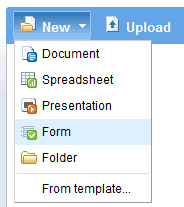
Google has now made forms even easier and quicker with fewer steps. Previously, you had to start with a spreadsheet and give it a name before selecting to create a form. Now, you simply select 'form' off the 'New' docs menu, and you're off and running:
From that point, you enter in the information for your quiz and save it as before. A spreadsheet will be created to collect your students' data, all in one convenient place so you can see at a glance how your students are doing.

Get the details here.

Related posts:
assessing understanding
call forms anything you like, just call them
FORMing rubrics
input facilitates output

Friday, May 30, 2008

@edu at Google Docs!

A couple of weeks ago, I was asked to guest-blog at Official Google Docs Blog, and today my first post appears. I'm very excited and honored to be able to discuss innovative uses of docs and forms in this forum, particularly for education, and hope you will join me there. The blog features useful tips, product announcements, and great ideas from users all over the web, and is an indispensable source for my teaching ideas.

If you're new to using forms, you might like a chance to see firsthand how they work. Go ahead and take the quiz below, and then I'll provide a link so you can see how your results were entered into a document/spreadsheet.


If you'd like to see how your responses compare to my 'students,' click here. All responses are collected into one document, making it easy to grade as well as see what needs going over.

With forms, Google has invented a tool with endless utility. It will change the way you think about assessing your students' work.

For more detailed instructions on how to put forms together for quizzes, see these posts: striking serendipity, and call forms anything you like, just call them.

Wednesday, May 28, 2008

book list: the game

In a previous post, must reads, I wrote about how I was challenged to read more books to better my reading score on the "1001 books to read before you die" list. I was bitten by the competitive bug, and it reminded me of the single-minded determination I see on the faces of teens as they struggle to beat a level of a video game. I suggested that we create a list of books recommended by high schoolers, and set it up in a spreadsheet so that they can keep their own score of how many books they've read, competing with themselves, against the list.

Voila: the completed reading list: High School Recommended Reads. It's been compiled into a Google spreadsheet that contains the tracking formulas. For your own use, make a copy of the spreadsheet and give it a whirl. Enter in an "R" for the books you've read and watch the yellow row formulate your total and the percentage of books you've read. Here's a picture of what the spreadsheet looks like:
Once you've played around with it a bit, you can delete these books, and enter the books and authors that your students recommend. Better yet, you can let your students make the entries themselves using a Google form:

It might be too late to use for this semester, but perhaps you could suggest a summer reading list?