Showing posts with label tools. Show all posts

Friday, September 19, 2008

table of contents

Google docs presents: Table of Contents!

If you assign reports or long essays, a table of contents is crucial:


Set up the table of contents in the format menu, which provides hierarchical entries for heading, subheading, and minor heading. Next, go to the insert menu to place it on the first page. Read more about it at Google docs help center.

Thursday, September 18, 2008

TestToob


TestToob is a new Web 2.0 interactive application geared specifically towards middle and high school students. They are able to upload videos of their science experiments, and hold online discussions with other students and teachers about the results. TestToob explains:
TestToob is a place exclusively developed to showcase experiments done by school-age scientists. It offers the most up-to-date tools, fosters wonder, and gives youth an opportunity for creative self-expression. Simply, it’s a place to learn, to grow and to have safe fun.
 
The creators stress that the application filters users for safety purposes, requiring parental confirmation at registration. Teachers are encouraged to use it as a means to enhance their lessons.

Web 2.0 for the classroom is at its best with applications like this.

Friday, September 12, 2008

on the road with wanderlust


Summer's over, but that rarely dampens the wanderlust of the traveling spirit. We're left to read about others' accounts, and now we can follow some of the greatest journeys in history and literature with Wanderlust.

The site maps out many of the world's great historical expeditions, such as the Northwest Passage, the voyages of Marco Polo, and the Lewis and Clark expedition, as well as a few found in novels. Commentary and pictures accompany notable points in each journey, such as the origination point of Kerouac's iconic road trip:


The skies outside my window are foggy right now--a perfect time for armchair travel with a Wanderlust map to the opposite coast, where I'll set sail on the Pequod, dogging the route of that elusive white whale.

Monday, September 8, 2008

World Names Profiler

One of the most rewarding projects in the classroom is exploring and sharing family heritage. Take your students to the World Names Profiler, which shows them where people are who share their surnames.

World Names Profiler holds an enormous database of names:

"We hold data for approximately 300 million people in 26 countries of the world, representing a total population of 1 billion people in those countries. In our database there are 8 million unique surnames and 5 million unique forenames."

Entering your surname will bring up a map in graduated shades of blue to denote the density of population sharing the name. Below the map is more information, such as the root of the name in group and subgroup. Finally, there are lists detailing how many per million live in specific countries and cities.

It's always fascinating to find out where in the world we come from.

Saturday, September 6, 2008

uncommon craftsmanship

So you're a teacher and you're a techie. But do you really feel comfortable teaching your students how to use all those Web 2.0 tools that you want them to become familiar with?

Of course, their tech expertise was nurtured in the womb. Kids and teens just seem to get it, when it comes to figuring out how to use applications. However, they may not fully understand the purpose of the tool or why they should use it. They will look to your for that explanation.

Fortunately, you can look to Common Craft, which claims that their "product is explanation." And their language is "plain English." Using conspicuously non-techie graphics, Common Craft explains the why? of web 2.0 tools. Two of their most popular videos explain how to use RSS (my personal favorite) and wikis, both of which are common tools for the classroom.

Whew! I can hear those sighs of relief all over.

Even if you don't use any of their videos (many are freely available), you'll want to watch one for a tutorial in how to give a concise and comprehesible presentation. This one explains, in plain English, how to use Google Docs:


Thursday, September 4, 2008

follow me to readerville

One of the most difficult aspects of assigning reading journals is, well, everything. Collecting the notebooks, reading the entry, grading, returning. I wish I had known about Readerville Note:books, because I would have taken my students there a long time ago.

Readerville is a book lover's website with a journal-keeping feature. Set up a notebook for jotting down your thoughts as you read a book. Enter as often as you like, a maximum of 750 characters for each entry.

You can set up your notebook to view each of your student's journal entries. If you or your students have websites, you can embed the journal entries, as I've done here, in the sidebar. Currently, I'm reading Everything is Illuminated, by Jonathan Safran Foer.

This is a lot less back-breaking than carrying all those notebooks around.

Wednesday, September 3, 2008

shiny new chrome

Google surprised us this week with Chrome, a new browser for the web. Maybe you don't pay much attention to which browser you use, but you drive one every time you access the internet. Think of it as the platform on which you cruise, the chassis, so to speak. 

About 77% of my readers currently use the Firefox browser to get to this site, according to Google Analytics. I have used Firefox faithfully since its initial release in 2004. Today, it enjoys nearly 20% share of web use, steadily chipping away at Internet Explorer's domination, and for good reasons: safety, tabs, and customization. Firefox's innovations forced all browsers to drive better and safer.

Google has financially backed Firefox development for years, so why build their own browser? It seems to come down to a difference in architecture philosophy. The things Google wants to do on the internet will be better served by building their own browser from scratch. They claim to not be at odds with each other, encouraging competition with this new entry into the browser market. Both are built upon open source platforms, and are freely available to anyone who wants to improve the browsing experience.

I've only been using Chrome for about 24 hours, but so far I'm impressed. Here's why:
  • speed: windows and tabs render very quickly
  • stability: if something on one tab goes whack, only that tab goes down. It doesn't freeze up and crash any other windows or tabs.
  • tabs technology: this (and safety) is why I moved to Firefox to begin with. Tab innovations changed how I used the internet, allowing me have several applications and reference website up at the same time. 
  1. Tabs in Chrome are placed above the url bar, not below, gaining me more viewing real estate. 
  2. I can move tabs from window to window as needed, and easily open them in separate windows. 
  3. Scrolling seems much improved, more consistent from page to page. 
  4. Having several tabs and windows open at the same time is significantly streamlined, making it easier for me to work. 
  • safety: incorporates strong anti-phishing technology, and fights malware with a hierarchy of read/write permissions, allowing entrance only to trusted sites, or sites you request.
  • intuitive? Very! Seems to know exactly where I want to go. Huge wow factor.

Why does any of this matter to you, the educator? Is it worthwhile for you to switch from Firefox to Chrome? I'll write more about that in my next post.


Thursday, August 21, 2008

Google moves from creator to sites

Earlier this year I recommended Google Page Creator as the easiest way to set up a web presence other than a blog. It was a great place to post instructions and links, or to have students attach their writing.

Google has moved on, however, to their feature-rich website builder, Google Sites, and has announced the decision to discontinue Page Creator. If you use Page Creator, not to worry; Google will automatically transfer your Page to a Site. Check out my @edu Google Site to get an idea of what you can do there.

Here are some instructions from Google Operating System for exporting files from Page Creator to transfer to Sites.

While I appreciated Page Creator for its ease of use in creating an attractive site, I'm thrilled with Google Sites. For my classroom, I call it home.

Related posts:
In my sites: Google sites
what's in your portfolio?

Saturday, August 9, 2008

animate the classroom with Animoto

It didn't take long for teachers to find the teachable moment in the Animoto video-making application. Now, Animoto has made special concessions for educators and students.

If you haven't tried Animoto, you should--it's a lot of fun to put a video together. The Animoto for Education site features some sample videos designed by teachers, but it's not fair for you to have all the fun.

The site explains how you can set up emails for your students that will enable you to have complete visibility over their creations, as well as provide for their privacy. The benefit to each student having his or her own account is that they can all create videos at the same time, and they can work on them at school or at home. With their own accounts, students can download their videos to present in class with or without an internet connection.

Here's an Animoto video I put together a few months ago to visualize Wordsworth's poem Tintern Abbey, emphasizing his themes of natural grandeur and soulful seclusion:

Thursday, July 31, 2008

diablogging: reading tools


This week, tools that enhance classroom reading are on the minds of the bloggers I read. Instructify reviews a very useful bibliography maker called BibMe, and Educamation discusses the social benefits of sites such as Shelfari and Library Thing.

Your students are going to love BibMe for its quick compilation of references in a variety of formats, including the most frequently cited: MLA, APA, and Chicago. You can upload information from almost any source, even film. Here is the MLA citation for the New York Times article I wrote about this week with regard to how online reading affects literacy:
Rich, Motoko. "Literacy Debate - Online, R U Really Reading? - Series - NYTimes.com." The New York Times - Breaking News, World News & Multimedia. 31 July 2008 .

If you register at the site, BibMe will keep track of your citations, a helpful feature when preparing a long research paper. Of course, we still need to teach students how the citation process works, and BibMe helps us out with a handy Citation Guide.

Do you keep track of the books you read? I have for decades, starting out by recording in notebooks, then discs and CDs, and now Library Thing and Google Books. Edumacation has a well thought out post about the pros and cons of using social media for students to showcase the books they've read.

These tools are useful, fun to use, and cost effective. Best of all, they provide great incentives to read and write.

Tuesday, July 29, 2008

Jing is the thing


Got a presentation coming up that requires detailed graphics and step-by-step instructions? Want to produce a slideshow to show associates how to use a web application? Do you maintain a class blog featuring hands-on lessons?

You need a screen-capture application. Are you looking for an application that is both free and easy-to-use? You need Jing.

I always like to to try out applications before they are featured on this blog. I've been working with Jing for quite a while now, and I'm thrilled with it. Jing's creators referred to their baby as a 'project' rather than the beta designation that we're used to seeing, because they weren't sure whether or not it would actually become a real product. Now, a year later, they've announced their intentions to continue to develop and support Jing.

What I needed was an easy-to-use, free, screen capture application so that I could demonstrate how to do things on the web. Jing allows me to capture any site, crop it to the dimensions I need, and even add pointer arrows and text to get my ideas across. Here's an example:

It takes mere minutes to complete an image, and you can save it to your system or to a free online account at Screencast.com. You can even create a video with your own soundtrack.

Jing may be just the thing you need to get your presentations and blog instructions in shape. Download the software for pc or mac, then click on the little sun that sits above your screen. You can remove it if you prefer, but who doesn't like a little sunshine in their lives? You're ready to create.

Treat yourself to Jing's video screencast, which is a enlightening demonstration in itself.

Sunday, July 20, 2008

documentary heaven


One of my favorite blogs for sources, Open Culture, features SnagFilms, a site with a large collection of documentaries for free viewing. This is great news for those of us who teach report-writing and argument-position essays.

Is your class reading Night, by Elie Wiesel? Supplement with a viewing of Paper Clips:

Whitwell Middle School in rural Tennessee is the setting for this documentary about an extraordinary experiment in Holocaust education. Struggling to grasp the concept of six-million Holocaust victims, the students decide to collect six-million paper clips to better understand the extent of this crime against humanity. The film details how the students met Holocaust survivors from around the world and how the experience transformed them and their community.


Lots of teachers I know include the popular Super Size Me video as a writing topic relevant to teens and college students, to emphasize the horrifying effects of unhealthy eating:

In SUPER SIZE ME, filmmaker Morgan Spurlock unravels the American obesity epidemic by interviewing experts nationwide and by subjecting himself to a “McDonald’s only” diet for thirty days straight. His Sundance award-winning feature is as entertaining as it is horrifying as it dives into corporate responsibility, nutritional education, school lunch programs and how we as a nation are eating ourselves to death.


SnagFilms not only provides a long (and growing) list of excellent documentaries, they make it easy to snag--or embed--the film for viewing directly from your class website or blog. Here's an inspirational story about how a tour of Africa changed the life of soulful singer Alicia Keys. Enjoy.

Friday, July 18, 2008

hi-tech sticky notes


Where would we be without sticky notes? I love them. There's something about their small size, which doesn't demand a lot, or waste much. And their lack of 'placement commitment' is intoxicating--I can put them anywhere I want. Then move them or change them around. Then put them back where they were in the first place. Or not.

I use them all the time. I encourage my students to use them for note-taking while they are reading, as placemarks with reminders, to set up timelines and mind maps.

There are digital sticky notes, and I've tried them all. My favorite at present is Awesome Highlighter, which is billed as a highlighter, but has a nice sticky note feature. The highlighter works great, too.

I'll leave you with this video which tells the story of a life in sticky notes--over 23,000 of them. It's got me thinking . . .

Sunday, July 6, 2008

Google Lit Trips


Pack your bags, grab your passport, pocket the camera. Traveling via the Google Lit Trip expressway is a window seat to vast literary worlds. Kevin Hurt of Edumacation commented on my recent post, mapping Jane Austen, about the literature mapping project at Google Lit Trips. Even some of my favorite contemporary authors, Cormac McCarthy for The Road, and Khaled Hosseini's The Kite Runner have been mapped and annotated using the Google Earth application.

As I mentioned in the previous post, download Google Earth first. The latest, and much-improved version is 4.3, and its new features will leave you amazed:


Wednesday, July 2, 2008

mapping Jane Austen


Maps are very useful in the language arts classroom, providing context and a grounded sense when reading literature. All those places come to life when we encounter our favorite characters in space and time. Google maps and Google Earth provide innovative ways for our students to traverse the globe, following routes mapped out by the authors we study.

The novels of Jane Austen present us with English settings that have grown large in our imaginations; now, we can apply technology to deepen our understanding.

LuciaM is our Google Earth master guide, leading us on a grand tour of the cities and towns where the characters of Jane Austen's novels have lived and traveled. First, you'll need to download Google Earth, and then download Jane Austen's Life & Works.

You'll find a map of England containing icons representing places for each of Austen's novels, as well as the placemarks of her life timeline. I was eager to view the sights from Pride and Prejudice, so I deselected everything else for the time being. Here's what the map looks like:


A single click on any of the P&P icons will pop-up information about the site and why it is relevant to the novel. A quote is also included:


A double-click will zoom you down to street level. Field trip, anyone? Do you get the feeling that it's not enough to bring literature to our students anymore? Now, we can take them to the places where novels were born.

Thursday, June 26, 2008

out of pocket dictionaries

I always keep several pocket dictionaries in the classroom, and we use them constantly. Since most of my writing (and much of my reading) is done online now, and the same is true for students, here are a few of my favorite out-of-pocket dictionary recommendations:

My most faithful companion for several years now is WordWeb, which offers a free download of a pc dictionary. Highlight any word and click on the icon in the task tray, and the definition comes up, along with synonyms, antonyms, and other very useful information. Sometimes I just need help with spelling, and if I've come anywhere close to the correct word, WordWeb will suggest the correct spelling.

In the classroom, we need to be able to share definitions, and that's where the next two web dictionaries come in handy. Definr bills itself at an "incredibly fast dictionary," and it is that. A kid-friendly mascot meeps! useful definition information in an instant. You can check out the word-of-the-day (today's word is 'cloture'), and even have it sent as a feed to your homepage or feedreader. What I especially like about Definr is that it uses the words in a sentence. A nice feature for Firefox users is a bookmark toolbar button, allowing for one-click lookup.

Ninjawords describes itself as "a really fast dictionary, fast like a ninja" and I'll vouch for its speed, though I don't know many ninjas. It provides all the information a useful dictionary should, with one outstanding extra feature: it maintains a history of the words you've looked up. That might be useful when you are gearing up for a vocabulary quiz.


Looking up words isn't what it used to be: now, it's 'really, incredibly' fast!

Tuesday, June 24, 2008

offline benefits


Though the feature has been available for some time, the Google homepage has recently been reminding us that we can use Google documents offline as well as online. The biggest benefit, of course, is that our documents are available anytime, anywhere, at any computer, whether or not we have an internet connection.

There is another benefit that may not be so readily apparent: offline means less distractions. A popular litany warns the overly-busy of the dangers of of multi-tasking (here and here and everywhere, for example), a moot point, really, since the linear brain has only a limited means to actually multi-task. It may come down to how gracefully we manage distractions, and how quickly we recover from them.

What is at stake is losing the ability to concentrate for any length of time, when what the mind really wants is to discover the next new thing that might be sitting in gmail or our feedreaders.

The answer is to turn off the internet, and click on the Google docs shortcut icon on the desktop. Try it. You'll get a lot of work done, and at the same time you'll be exercising those resistance muscles.

Monday, June 23, 2008

teen literary trends


Alternative Teen Services offers book recommendations and reviews of young adult literature. They report that a current trend in teen reading is free-verse novels, a genre in which novels are written in verse form, rather than paragraph form. My introduction to this novel structure was with Autobiography of Red by Anne Carson, published in 1998.

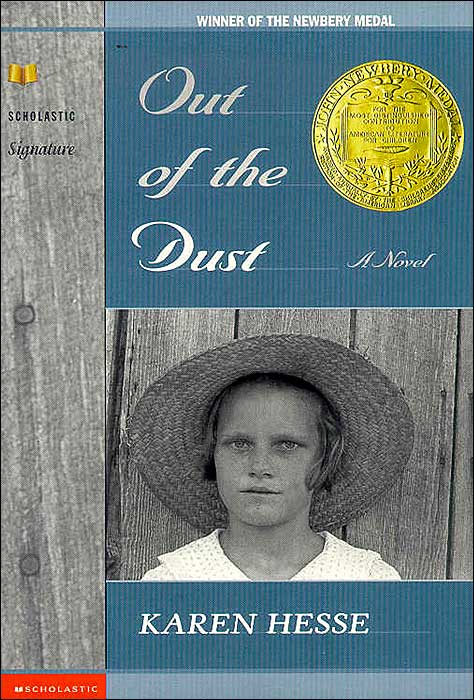
Karen Hesse's Out of the Dust won a Newberry Medal that same year. You can sample the verse-novel experience by searching for this book at Google Books .

The reason this article caught my attention is because my summer reading has begun with Vanishing Point by David Markson, a novel described as experimental fiction. Unlike Out of the Dust, it's not free verse, but more of a fragmented, non-linear narration. Take a look at a page or two.

Are you familiar with Google Books? Besides being able to preview pages of books, you can search for any term inside. For instance, Markson made some references about William Blake that I know I will want to come back to. By entering Blake in the search field, I'm able to look at any page with that word. Very convenient. The application also provides information about where I can buy the book, or find it in a library.

Up until now, free-verse novels haven't gone mainstream. Leave it to teens to show us what we've been missing.

Wednesday, June 18, 2008

teach and delight


We know the positive results of getting our students to write about issues. They tend to write with more interest and passion because they are writing about something they care about. Ideally, they will conduct their own research with little prompting. The trick is to get them interested in the first place.

Here are three sites built with Flash technology that provide just enough factual information about environmental issues to get your students going. You will want to spend some time at the sites yourself, because they are amazing.

  • The interactivity of nationalgridfloe allows us to calculate our carbon footprint--daily activities--to see how they affect creatures as far away as the North Pole.
  • A popular ice-cream maker sponsors helpthehoneybees, reminding us that healthy bee colonies are responsible for many of the tasty things that go into our favorite summer treat: berries, nuts, and honey.
  • Taking a tongue-and-cheek look at lightbulbs, unscrewAmerica, makes a convincing case for citizens for environmental enlightenment.

These are dazzling interactive sites, reminding us of Aristotle's maxim to both teach and delight.

Thursday, June 12, 2008

emerging themes with Wordle


Sometimes the best way to understand the major themes of a text is to view the preponderance of words that occur. In the old days, we had concordances for this task. Today, we have Wordle. Simply copy/paste a section of text into the application, and it produces a word graphic.

This picture is a breakdown of the word usage in Wordsworth's Preface to Lyrical Ballads. Language, Poetry, Nature, Feelings, Pleasure, Passions . . . yes, I think Wordle got Wordsworth right.

Point your students to this tool, using words from their own writing, for some instant--and colorful--graphi-fication!